
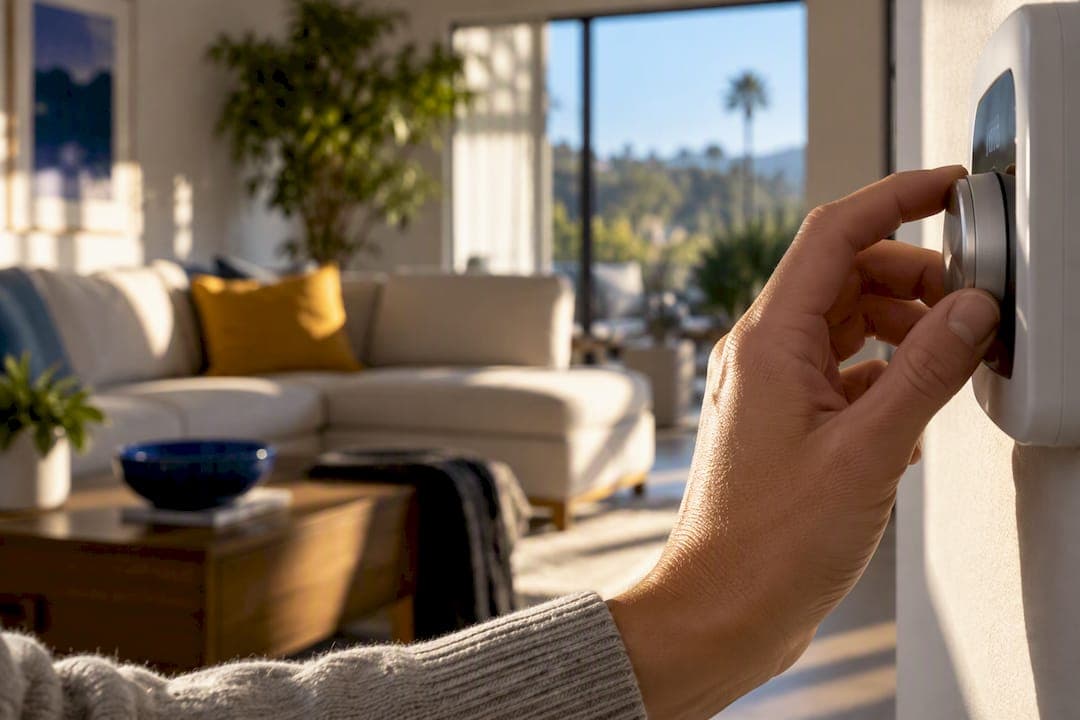
Start at 78°F when you're home, and treat that number as your baseline, not your ceiling. Raise the thermostat further when you leave the house or go to sleep, and let ceiling fans and pre-cooling before peak hours, do the work that would otherwise cost you money. That combination, backed by DOE guidance, covers most of what a California summer thermostat strategy needs.
TL;DR:
- Raising the thermostat to 80°F instead of 78°F can save roughly 4% on cooling costs without noticeable comfort loss for most households.
- Setting your away thermostat 7 to 10 degrees higher for about eight hours daily could cut your overall cooling and heating bills by up to 10%.
- Ceiling fans and shading techniques can make a 78°F setting feel like 74°F or lower, significantly reducing energy use without sacrificing comfort.
- Smart thermostats may offer additional savings through demand-response programs, but their effectiveness depends on your HVAC system type and proper programming.
- Proper thermostat placement, ductwork, and building envelope improvements are critical to avoiding comfort issues and maximizing cooling efficiency.
Table of Contents
- What Are the Best Thermostat Settings for a California Summer?
- Should You Get a Smart Thermostat or Stick With Programmable?
- How Do Fans and Shading Help You Raise the Thermostat?
- Why Isn't Your Home Cooling Right Even After You Adjust the Thermostat?
- Does Humidity Change What Your Thermostat Should Be Set To?
- How Much Does Each Thermostat Setting Actually Cost You?
- Can You Run Your Thermostat Off Solar Power in California?
- Do Coastal and Inland California Homes Need Different Settings?
- Edward's Local Perspective: What I Tell Homeowners
- How E320air Can Help With Your Thermostat and Cooling System
- Primary Sources and Utility Guidance
- Sources
- FAQ
What Are the Best Thermostat Settings for a California Summer?
The U.S. Department of Energy recommends setting your cooling thermostat as high as you can comfortably stand while you're home, and 78°F is a commonly recommended setting in California utility guidance. PG&E puts it plainly: every degree above 78°F saves roughly 2% on cooling costs, health permitting. Push it to 80°F and you're looking at savings without much of a comfort penalty for most households.
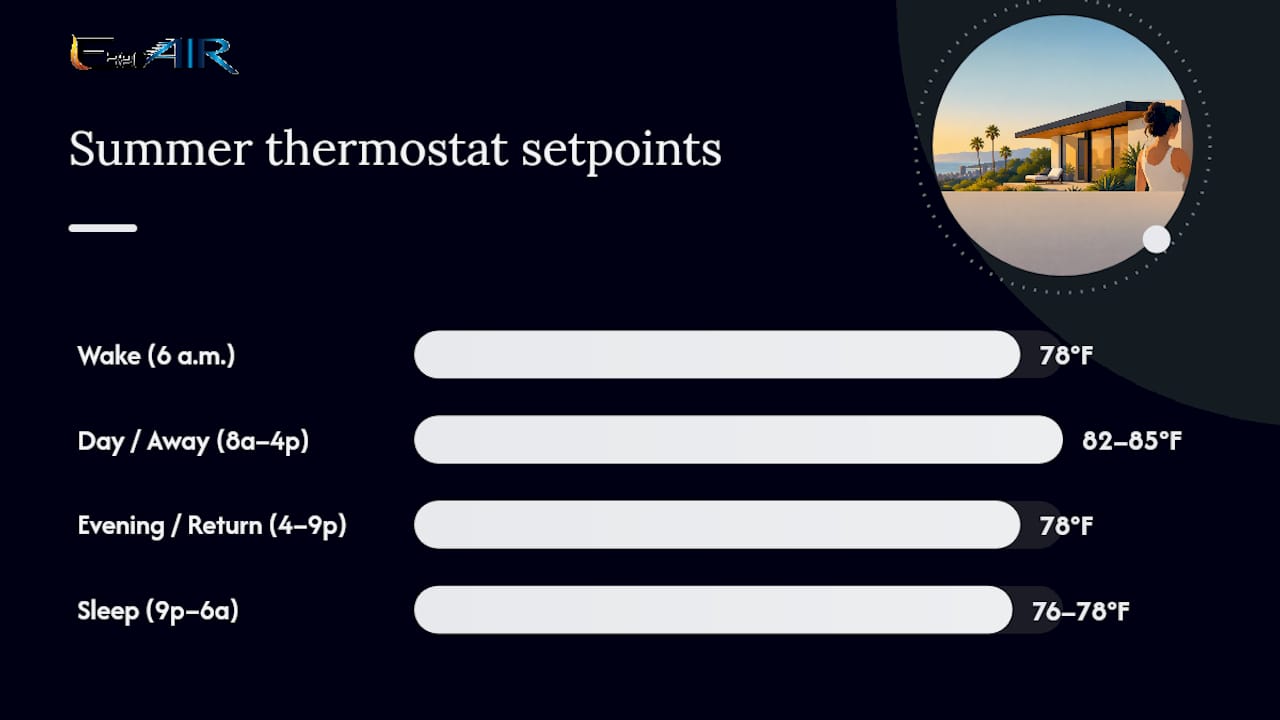
The bigger win comes from what you do when nobody's home. DOE's guidance is specific here: turning your thermostat up 7 to 10 degrees for eight hours a day can cut your annual cooling and heating costs by as much as 10%. That's not a small number when you're running AC for four or five months a year in the Inland Empire or the Central Valley.
A simple four-period schedule, modeled on ENERGY STAR's programmable thermostat framework, gives you a template to copy directly into a programmable or smart thermostat:
- Wake (6 a.m.): 78°F, cooling starts before the heat builds
- Day/away (8 a.m. to 4 p.m.): 82 to 85°F if nobody's home, less aggressive if you work from home
- Evening/return (4 to 9 p.m.): step back to 78°F, timed around your utility's peak window
- Sleep (9 p.m. to 6 a.m.): 76 to 78°F, or slightly warmer if a fan is running
That schedule needs adjusting for real households. If you have pets home during the day, don't let the away setting climb past 82 to 85°F. Elderly residents or anyone with respiratory or cardiac conditions should keep daytime temperatures closer to 78 to 80°F regardless of who's paying the bill. And during multi-day heat waves, when overnight lows stay above 75°F, sleeping at 78°F might actually feel better than fighting a stubborn setback that never quite catches up. For more on how these numbers shift across seasons, our heating temperature guide for California homes covers the colder half of the year.
Should You Get a Smart Thermostat or Stick With Programmable?
A programmable thermostat runs a fixed schedule you set once and adjust occasionally. A smart thermostat learns your patterns, connects to your phone, and in many cases talks directly to your utility for demand-response programs and time-of-use rate optimization. For California homeowners on tiered or TOU billing, that utility connection is the real differentiator.
If you're shopping for either type, check for these ENERGY STAR criteria before you buy:
- At least four programmable periods (wake, day, evening, sleep)
- Temperature control accurate to within ±2°F
- Recovery and hold features that ramp cooling up gradually instead of blasting the system
- Pre-programmed setpoints already aligned with efficiency targets, typically 78°F or higher for cooling
One caveat worth knowing before you set aggressive setbacks: DOE's smart thermostat benchmarking research found that savings vary by equipment type, and multispeed or variable-capacity systems don't always respond to deep setbacks the way older single-stage units do. A heat pump recovering from an 8-degree swing can sometimes run less efficiently than one holding a steadier band. That's a system-specific question, and it's worth a professional check before you program anything dramatic. Our breakdown of how thermostats affect HVAC efficiency goes deeper into why runtime and equipment type matter as much as the setpoint itself.
Pro Tip: Before buying a smart thermostat for utility rebate eligibility, check your provider's current program requirements directly. Rebate terms change more often than most retail packaging does.
How Do Fans and Shading Help You Raise the Thermostat?
Run ceiling fans counterclockwise in every room you're actually using, and turn them off in empty rooms. A ceiling fan lets you raise your thermostat setting by roughly 4°F without any loss of comfort, which turns a 78°F setpoint into something that feels like 74°F for a fraction of the energy cost.
SDG&E's thermostat guidance lays out a pre-cooling strategy that works well with California's summer rate structure: cool your home down starting up to three hours before the 4 p.m. on-peak window begins, then let the thermostat climb to 78°F or higher through the peak period, and return to your normal evening setting after 9 p.m. From June through October, that on-peak stretch is exactly when electricity costs the most and grid demand is highest.
Four more moves stack on top of that strategy:
- Close blinds and curtains on sun-facing windows before the sun hits them, not after the room's already hot.
- Skip the oven and dryer during mid-afternoon hours; both dump heat straight into your living space right when your AC is working hardest.
- Replace or clean your AC filter on a regular schedule. A clogged filter restricts airflow and forces the system to run longer to hit the same setpoint.
- Set your fan setting to "Auto," not "On." Continuous fan operation circulates air even between cooling cycles, which quietly erases much of the benefit your setbacks were supposed to deliver.
Each degree you push past 78°F saves about 2% on cooling costs, so a household running comfortably at 80°F instead of 76°F is looking at roughly an 8% reduction in cooling costs for that stretch of the day, with the fan and shading tricks making the higher number feel unnoticeable.
Why Isn't Your Home Cooling Right Even After You Adjust the Thermostat?
Before you touch the schedule again, check where the thermostat itself is mounted. A unit placed in direct sun, near a supply vent, or next to a heat-generating appliance reads the room wrong and drives the whole system on bad data. That's a control problem, not an equipment problem, and it's an easy one to rule out first.
If the thermostat location checks out and comfort still isn't matching the setpoint, a few signs point toward something mechanical:
- One room runs hot while others feel fine, suggesting a duct or airflow imbalance
- The system runs constantly without ever seeming to catch up
- Airflow at the vents feels weak compared to what you remember from past summers
Try the basics first: swap the filter if it's overdue, confirm vents aren't blocked by furniture or rugs, and check that the breaker hasn't tripped. Write down when the problem happens, how long the system runs, and which rooms are affected. That's exactly what a technician needs to diagnose the issue quickly instead of guessing. A proper professional visit typically covers system sizing, refrigerant charge, and a full duct inspection, the kind of diagnostic work that a schedule change alone can't replace.
Does Humidity Change What Your Thermostat Should Be Set To?
California's summer humidity swings hard depending on where you live, and that swing changes how a given setpoint actually feels. Coastal and some Central Valley locations run noticeably more humid, especially during monsoonal moisture pushes in August, and the same 78°F can feel sticky and warm.
Your air conditioner already removes moisture as a byproduct of cooling, but a system that's oversized for the space short-cycles, running just long enough to hit the temperature setpoint without running long enough to pull real humidity out of the air. That's one reason a home can hit 78°F on the thermostat and still feel uncomfortable. If your indoor humidity regularly sits above 55%, you're probably better off nudging the setpoint down 1 to 2 degrees rather than chasing comfort by cranking the fan speed, since a slower, longer cooling cycle actually removes more moisture than a fast, aggressive one.
Whole-home dehumidifiers integrated with your HVAC system are worth considering if you live in a consistently humid pocket of the state and find yourself fighting the thermostat all summer. They let you keep the setpoint at 78°F for the energy savings while handling the sticky feeling separately, instead of over-cooling the whole house to compensate for moisture the AC alone can't manage efficiently.
How Much Does Each Thermostat Setting Actually Cost You?
The math on thermostat settings is more forgiving to remember than most people expect: each degree above 78°F saves roughly 2% on your cooling bill, and that scales in both directions.
Time-of-use pricing makes the calculation sharper. Running your AC hard during a 4 p.m. to 9 p.m. peak window costs measurably more per kilowatt-hour than running it at 10 a.m., independent of the setpoint itself. That's why SDG&E's pre-cooling strategy matters as much as the temperature number: shifting your cooling load into cheaper hours and coasting through the expensive ones on stored cool air changes your bill even if your average daily setpoint doesn't move.
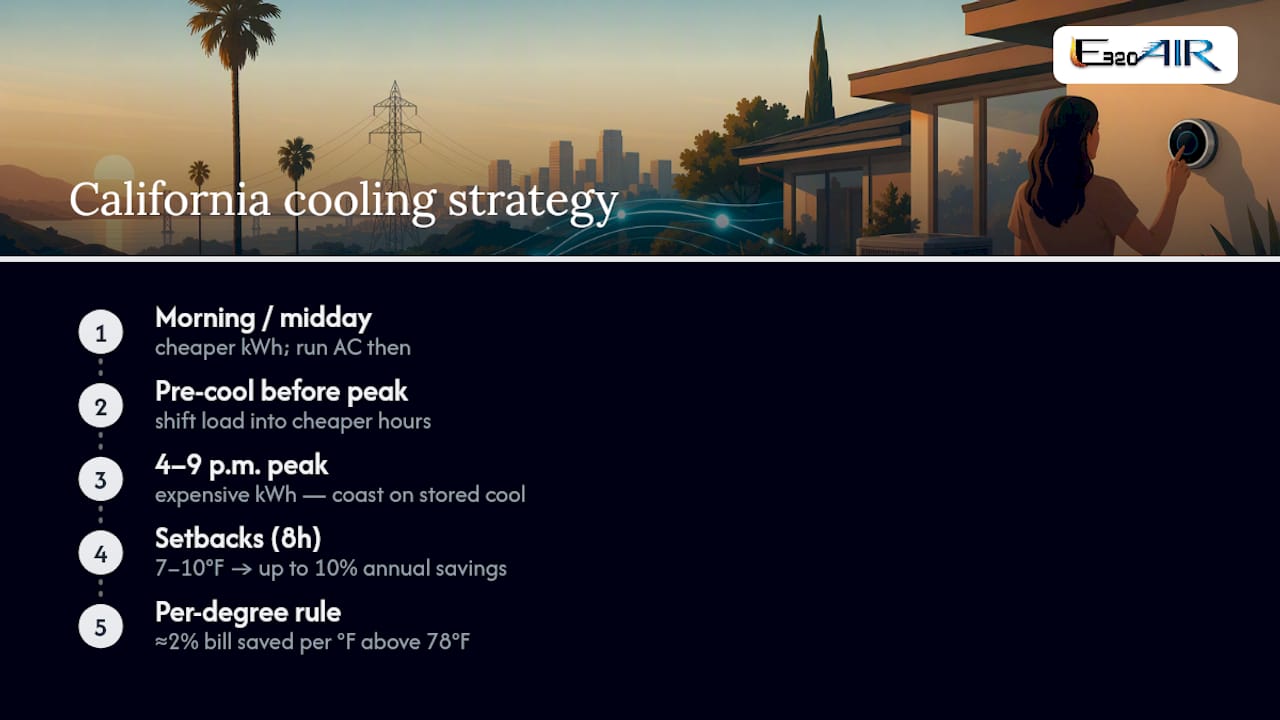
Setbacks compound the savings. DOE's estimate of up to 10% annual savings from a 7 to 10 degree setback for eight hours a day assumes a household actually sticks with the schedule daily, not just on days when someone remembers to adjust it manually. That's the real argument for a programmable or smart thermostat over a manual dial: the savings depend on consistency, and consistency is exactly what humans are bad at and thermostats are good at.
Older, poorly insulated homes lose that battle faster than newer construction. If your ductwork runs through an uninsulated attic or your windows are original single-pane glass, your system fights harder to hold any setpoint, which erases some of the savings a newer home would see from identical settings. Addressing the building envelope, including things like weatherstripped doors and better window coverings, often moves the needle more than any further thermostat tweak once you're already near 78°F.
Can You Run Your Thermostat Off Solar Power in California?
California has more rooftop solar installations than any other state, and pairing solar with a smart thermostat changes the math on when to run your AC. If your system includes battery storage or you're on a net-metering arrangement, pre-cooling your home during peak solar production hours, typically late morning through early afternoon, lets you run your AC on power you're generating for free rather than pulling from the grid during expensive evening peak hours.
That timing runs slightly counter to the SDG&E pre-cool guidance built around a 4 p.m. peak start. Solar households often do better pre-cooling earlier in the day, around 11 a.m. to 2 p.m. when panels are producing the most, then coasting through the 4 to 9 p.m. peak window on residual coolness rather than trying to squeeze pre-cooling into the three hours right before peak starts. A smart thermostat that can integrate with your solar monitoring system, or at least follow a schedule tuned to your production curve, gets more mileage out of panels you've already paid for.
Without battery storage, the calculation shifts again. Solar production drops off before the evening peak hits, so a home relying purely on daytime solar generation still needs a pre-cool strategy that leans on stored coolness in the structure itself, not on real-time panel output, to get through the 4 to 9 p.m. window affordably.
Do Coastal and Inland California Homes Need Different Settings?
A home in Riverside or San Bernardino faces a different summer than a home in Santa Monica or Ventura, and the thermostat strategy should reflect that. Inland Empire summers regularly push past 100°F, sometimes for weeks at a stretch, which means the gap between your indoor setpoint and outdoor temperature is enormous. That gap makes pre-cooling and aggressive away setbacks especially valuable inland, since the system has more thermal difference to work with once temperatures drop after sunset.
Coastal homes rarely see triple digits, but they deal with humidity and marine layer moisture that inland areas don't. A coastal home holding steady at 78°F might not need the same overnight setback depth as an inland home, because overnight lows near the coast often drop into the 60s even in August, letting natural ventilation handle part of the cooling load. Opening windows overnight and switching to AC only during the afternoon peak can work well in coastal zones in a way it simply can't in Palm Springs or Hesperia.
Desert and high-desert communities need the most conservative approach of all, since overnight lows sometimes barely dip below 80°F during the hottest stretches of July and August, leaving almost no window for passive cooling. Those households benefit most from the full pre-cool, setback, and fan combination working together, since there's no free cooling coming from outside air at any hour.
Edward's Local Perspective: What I Tell Homeowners
Thermostat placement causes more complaints than people realize. I've walked into homes where the thermostat sat six feet from a west-facing window, and the homeowner was chasing a setpoint the unit could never actually confirm. Move the thermostat, or shade that wall, before you touch a single schedule.
I'm also more conservative with setbacks in older homes than most online guides suggest. A 1970s home with attic ductwork and single-pane windows recovering from an 85°F daytime setback can run for hours trying to catch up, which sometimes costs more than a gentler 3 to 4 degree swing would have. When a home fights its own settings no matter what you try, that's when it's worth scheduling an inspection rather than guessing at another schedule.
— Edward
How E320air Can Help With Your Thermostat and Cooling System
Getting the schedule right only gets you so far if your equipment or ductwork is working against you. E320air handles the diagnostic work a thermostat setting can't replace: thermostat installation and upgrades, full HVAC tune-ups, system sizing checks, and ongoing maintenance for homes across the Inland Empire.
A typical service visit starts with an inspection of your system and thermostat placement, followed by a transparent estimate before any work begins. Financing options are available for larger upgrades, and E320air's technicians are licensed, insured, and available around the clock, including weekends and holidays, for repairs that can't wait. If your home holds a temperature that just doesn't feel right no matter how you program the schedule, or if you're ready to upgrade to a smart thermostat that actually fits your equipment, schedule a service visit or check out the installation options available for your home.
Primary Sources and Utility Guidance
This article draws on DOE Energy Saver guidance, ENERGY STAR thermostat eligibility criteria, and California utility recommendations from SDG&E and PG&E. Homeowners considering building-envelope upgrades that reduce cooling load can also review how new interior doors improve energy efficiency in older homes.
Sources
- U.S. Department of Energy: DOE guidance
- ENERGY STAR eligibility criteria for programmable thermostats
- San Diego Gas & Electric thermostat tips
FAQ
What temperature should I set my thermostat to in summer in California?
Start at 78°F when you're home, which aligns with both DOE and PG&E guidance. Raise it further when you're away or asleep, and use ceiling fans to make 78°F feel closer to 74°F.
How much can I save by raising my thermostat in summer?
DOE estimates that turning your thermostat up 7 to 10 degrees for eight hours a day can save as much as 10% annually on heating and cooling costs.
Should I turn off my AC completely when I'm not home?
No. Turning the system off entirely lets indoor humidity and temperature climb too high, forcing the AC to work much harder to recover later. A setback to 82 to 85°F while away, per the four-period schedule ENERGY STAR recommends, saves energy without that recovery penalty.
Do smart thermostats really save more money than programmable ones?
Smart thermostats can unlock utility demand-response programs and time-of-use optimization that basic programmable units don't offer, but actual savings vary by equipment type. A programmable thermostat that's actually used consistently often outperforms a smart thermostat left on factory settings.
Does E320air install and program smart thermostats?
Yes, E320air handles thermostat installation and upgrades alongside full HVAC tune-ups and system sizing checks across the Inland Empire. Pricing depends on the equipment and scope of work, and current details are available directly through E320air's installation page.